8 minutes
AnotherMazeBench: A Completely Unnecessary Benchmark That Tests a Model’s Maze Solving Capabilties
Have you ever wondered if an LLM can solve a maze? Probably not. It is likely a not a good use of water or usage credits. However, in the odd event that you might have, I have the results for you! But why, you may ask? Well, for science! (And also because I recently received my half-yearly bonus and decided to burn some of it.)
Note: There are already other similar benchmarks which are much more scientific and well researched. If you are looking for a real answer, I would recommend you use these instead:
- https://github.com/alrod97/LLMs_mazes (and the accompanying paper)
- https://mazebench.com/
(I could not confirm reliably if both the above are the same.)
All mazes, results, and charts for this benchmark are in this github repo.
Generating the Mazes
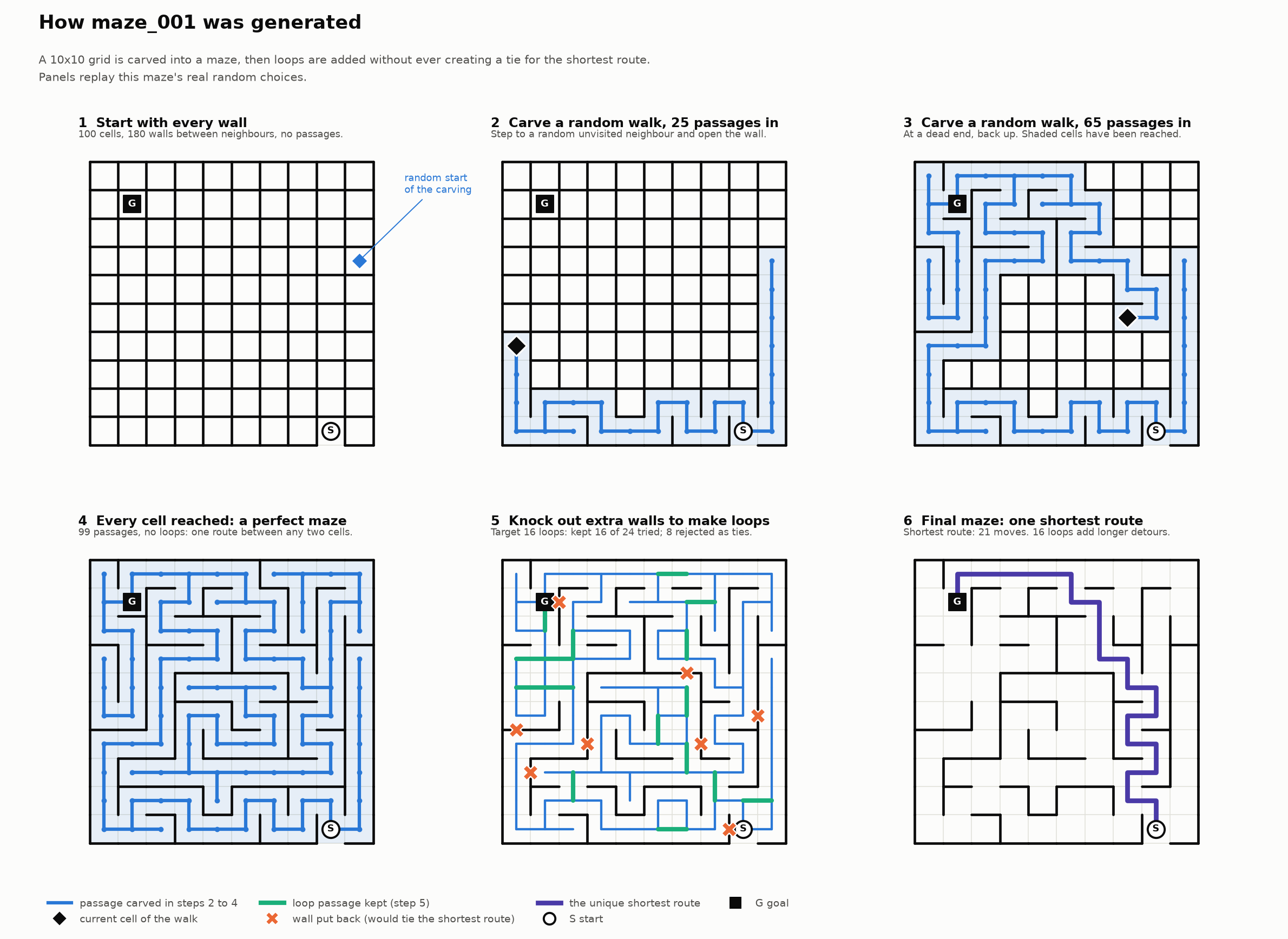
The benchmark is a 100 mazes, generated programatically:
- Each maze has exactly one shortest route from start to goal. 85 of the 100 also contain loops, so longer alternative routes exist and a model can solve a maze without finding the shortest route. 15 are perfect mazes with a single route.
- The entry is a gap in the outer wall, with 25 mazes entered from each side. The goal is a random cell anywhere in the grid, including corners, edges and the centre.
This is an illustration to show how the first maze was generated. Every maze was generated using the same procedure.
Model Selection
I selected 15 models available on OpenRouter released in the last 6 months as of 10/17/2026. The metric I used to select the model is an incredibly novel technique I discovered called HIHOTM™ (Have I Heard of This Model). I tried to have 1 model per provider but I made 2 exceptions for Claude and Gemini (because I wanted to land at a nice number like 15 and using HIHOTM I was only at 13 unique providers). Because I wanted to also do some more useful things with my bonus, I decided to pick the cheapest model from providers that have multiple models (again, except for Claude and Gemini). In no particular order here is the list of models:
anthropic/claude-haiku-5.5 | openai/gpt-6-luna | nvidia/nemotron-3.5-super-vl |
z-ai/glm-5.3-flash | deepseek/deepseek-v4.1-flash | xiaomi/mimo-v2.6-pro |
google/gemini-3.8-flash | mistralai/mistral-large-4-0 | meta/muse-spark-1.3 |
qwen/qwen3.8-max-0902 | x-ai/grok-4.7 | anthropic/claude-sonnet-5.5 |
google/gemini-4-argon | moonshotai/kimi-k3 | minimax/minimax-m3.1-flash |
Describing Mazes
I initially started by asking the model to provide a solution to the maze. But after the first few runs using glm-5.3-flash I found that all the answers were really off. I began to suspect that the model is not able to understand the maze itself, let alone solve it. So the “official” first experiment was to have the model describe the maze.
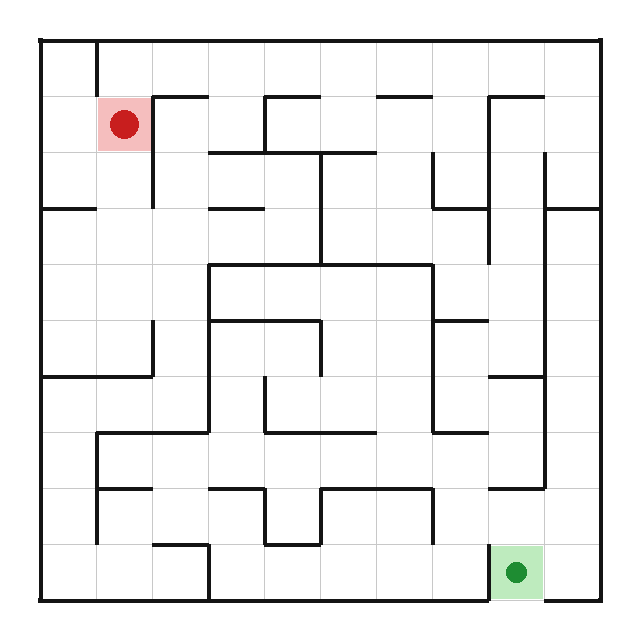
The model reports the start cell, the goal cell, and for every pair of neighbouring cells whether a wall separates them. Walls are reported as two grids of 0/1 characters: right_walls (10 rows of 9, the wall between a cell and its right neighbour) and down_walls (9 rows of 10, the wall between a cell and the cell below). That covers all 180 gaps in the grid. The outer border is not reported. The answer is one JSON object. Walls are described like this in the output:
   "right_walls": [
    "100000000",
    "010100010",
    ...
   ],
   "down_walls": [
    "0010101010",
    "0001110000",
    ...
   ]
A 0 indicated no wall and a 1 indicates a wall. Each string represents a row. The verticals walls in the row are noted in right_walls and the horizontal walls are noted in down_walls.
The above output is for this maze:
Based on the JSON, I do some math:
| Measure | Definition |
|---|---|
| start / goal correct | the reported cell is exactly right |
| wall edge accuracy | share of the 180 gaps reported correctly |
| wall recall | share of real walls that were reported |
| wall precision | share of reported walls that are real |
| exact | all 180 gaps correct |
Missing or malformed parts of an answer count as wrong. Only about 36% of the gaps contain walls, so a model that reports no walls at all scores about 63% edge accuracy. That is the baseline for edge accuracy, and recall and precision must be read alongside it, since a high edge accuracy can come from reporting too few walls.
(Effort note: Every model is run with the default effort other than glm-5.3-flash which runs with effort low because the runs without an explicit effort reasoned until the model ran out of context and did not return any output.)
(I also dropped kimi-k3 and grok-4.7 after a trial run of 3 mazes. kimi-k3 was too expensive and from the small sample, it was evident that it was not going to get further evaluation. Same for grok-4.7 but also grok-4.7 was exceptionally slow - requiring 10+ minutes to describe a maze. Therefore these are not represented in the charts.)
I first ran the models on the first 20 mazes to find the top 5 models for further evaluation. Here are some pretty charts:
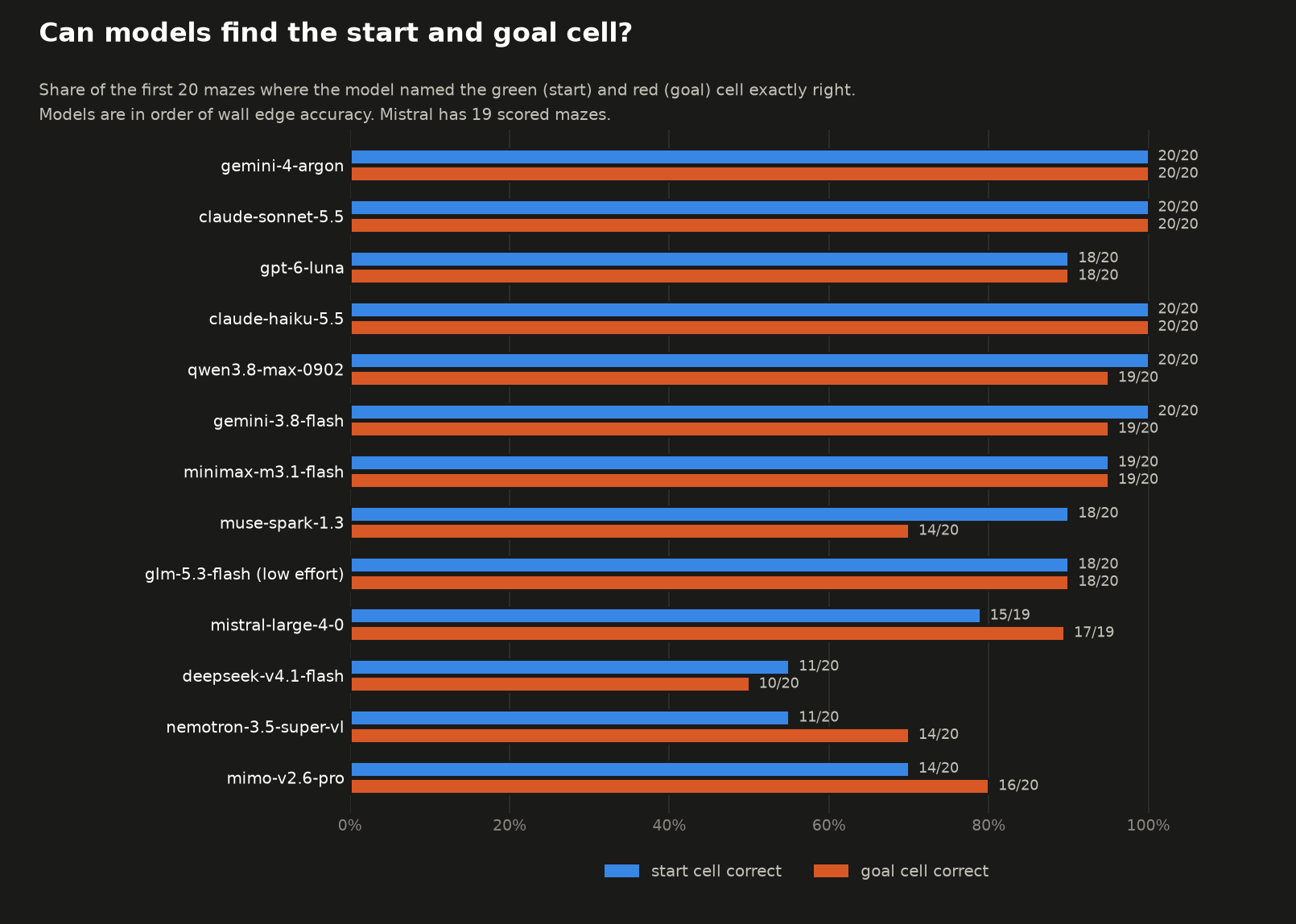
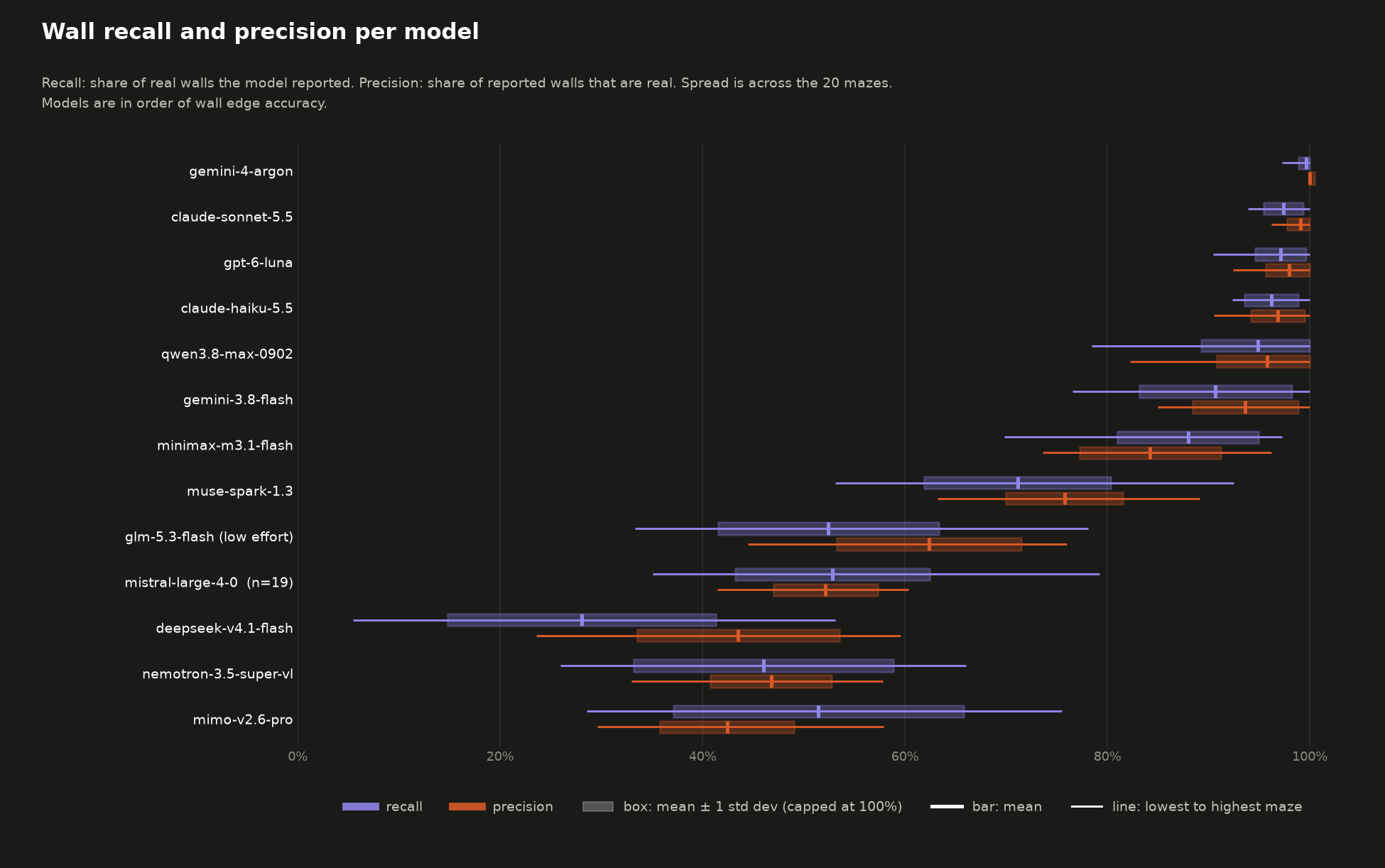
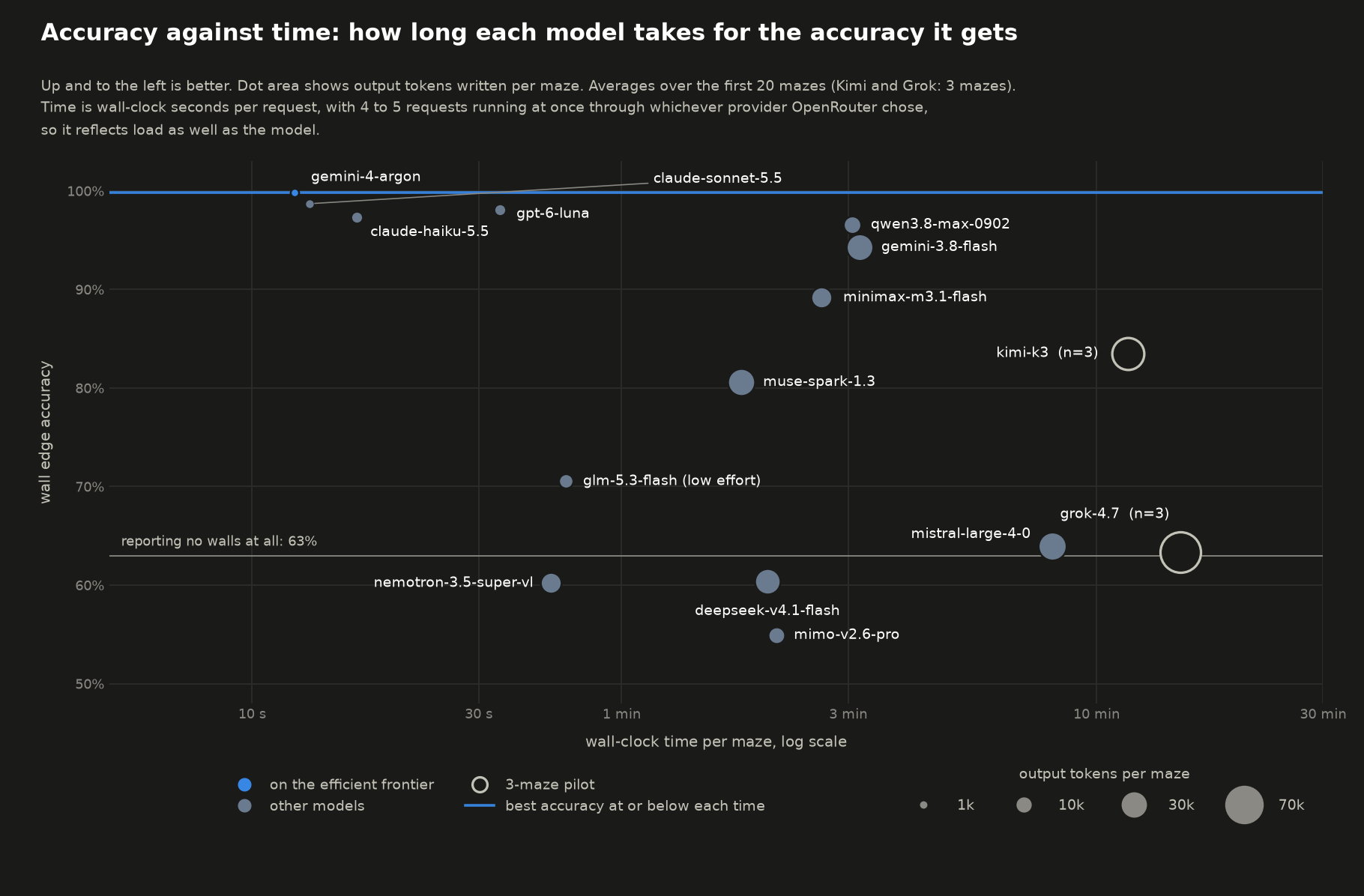
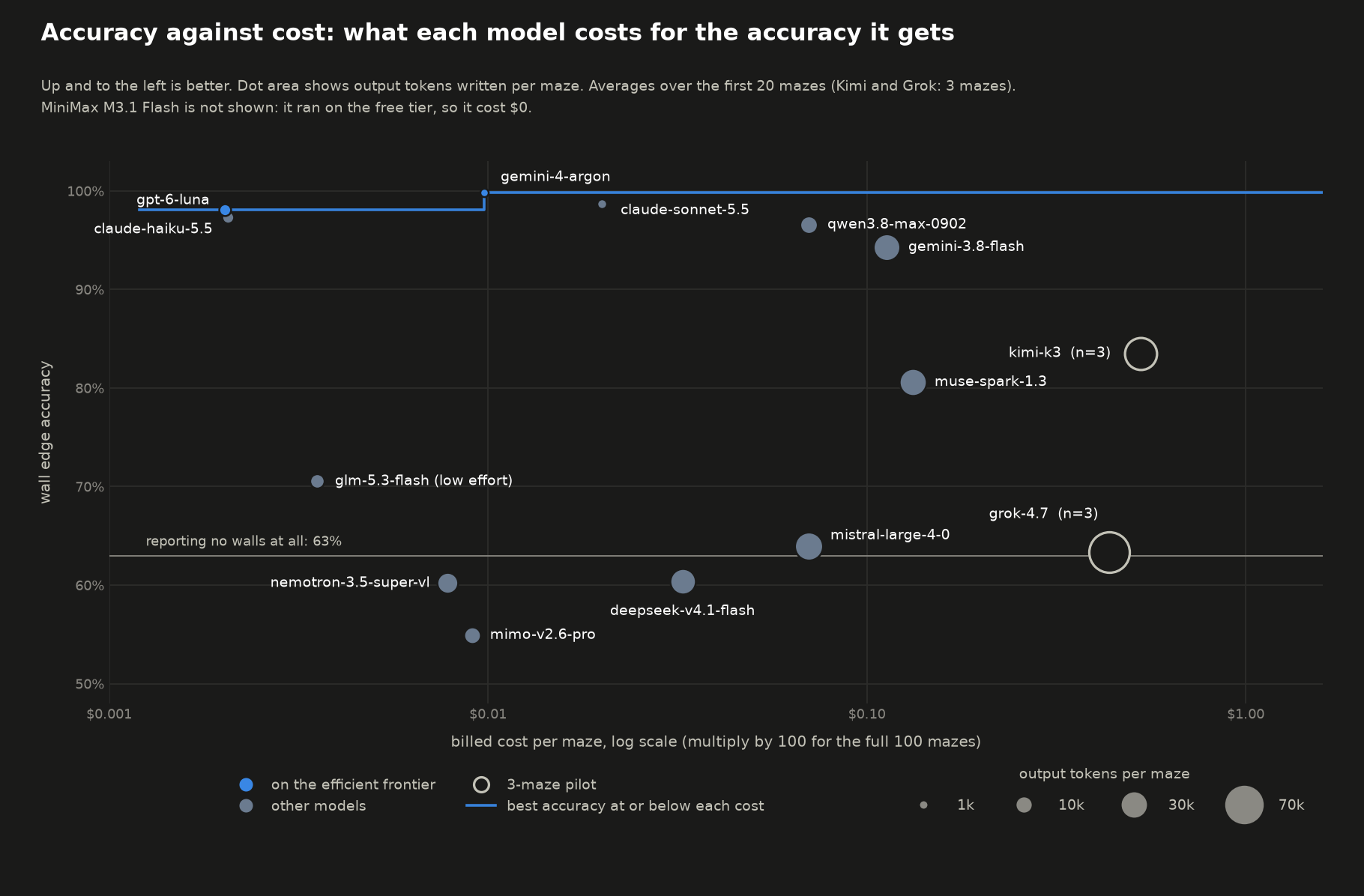
Based on this data, we can divide the models into 3 tiers:
Tier 1 (F1 > 95%):
gemini-4-argon99.8%,claude-sonnet-5.598.2%,gpt-6-luna97.5%,claude-haiku-5.596.5%,qwen3.8-max-090295.3%Tier 2 (F1 85–95%):
gemini-3.8-flash92.1%,minimax-m3.1-flash85.9%Tier 3 (F1 < 85%):
muse-spark-1.373.2%,glm-5.3-flash (low effort)56.7%,mistral-large-4-052.0%,nemotron-3.5-super-vl45.4%,mimo-v2.6-pro45.2%,deepseek-v4.1-flash32.9%
Conveniently tier 1 has exactly 5 models and the F1 bar is also a nice 95% (I love multiples of 5…). The next part involves running these models on the remaining 80 mazes.
Describing all 100 mazes
The 5 highest-ranked models from step 2 repeat the description task on all 100 mazes. 20 mazes is enough to separate strong from weak readers but gives noisy estimates for models that are close, so the larger sample settles the ordering among the best models and shows how accuracy varies with entry side and goal position.
Here are some more pretty graphs:
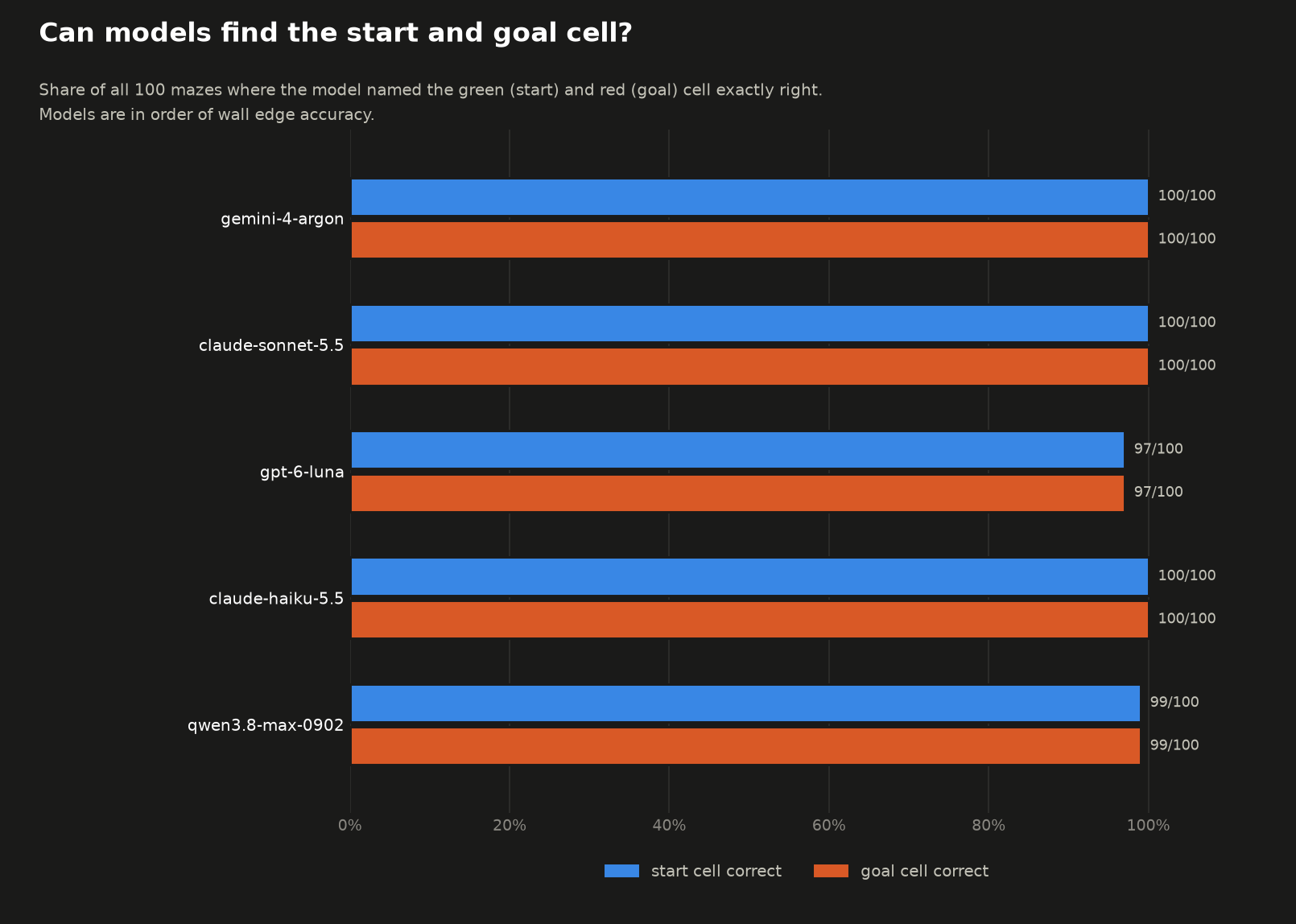
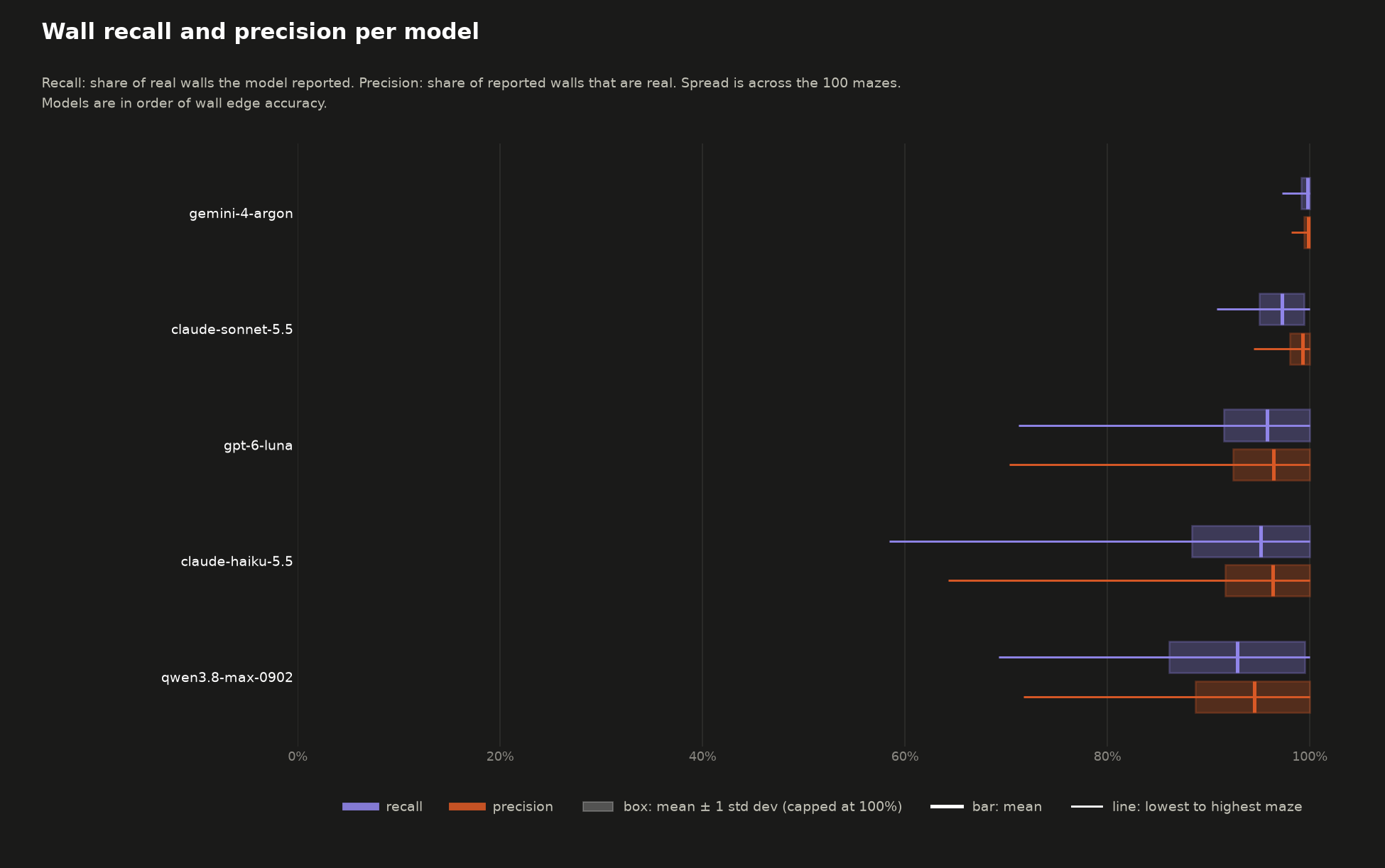
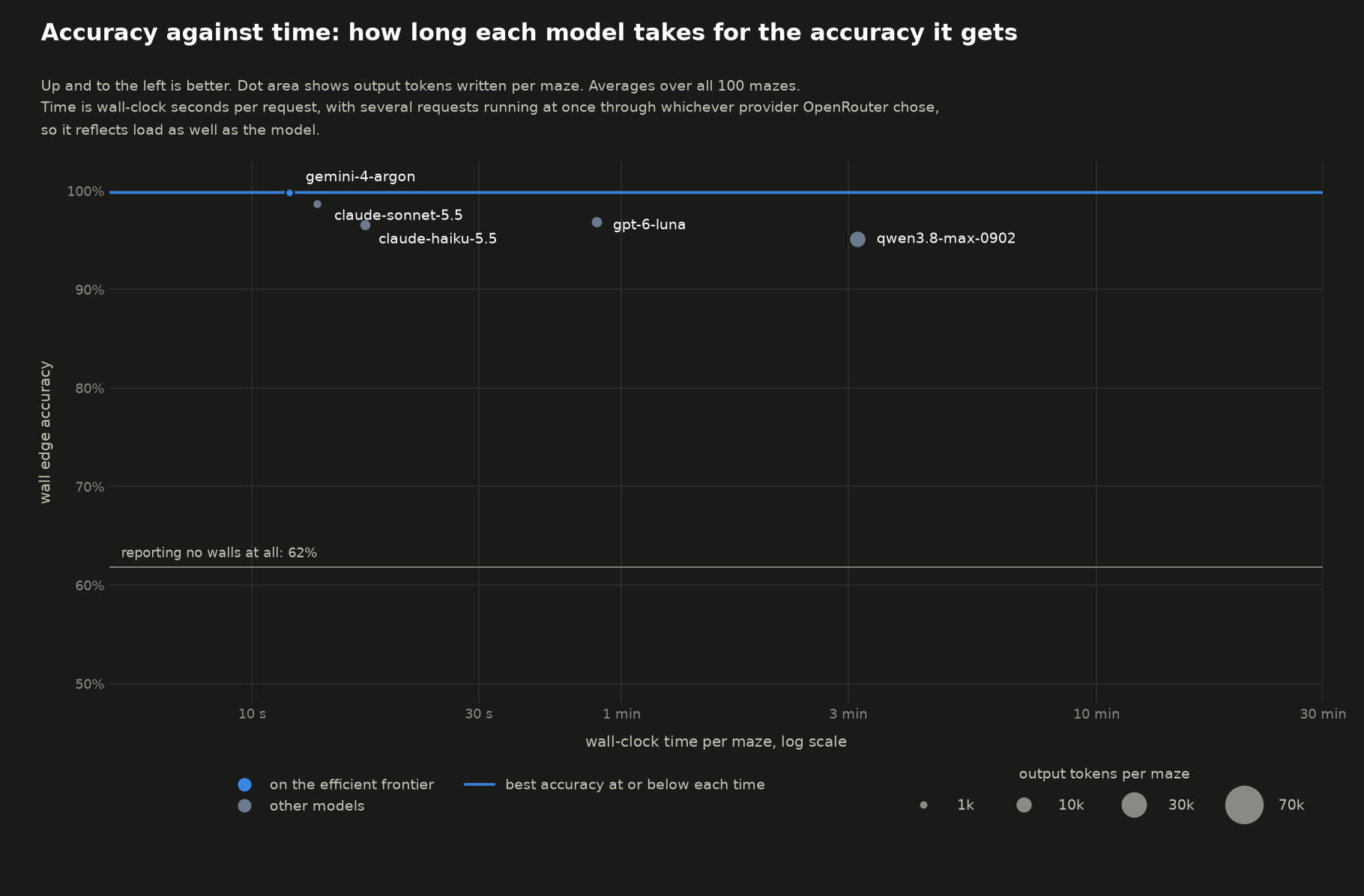
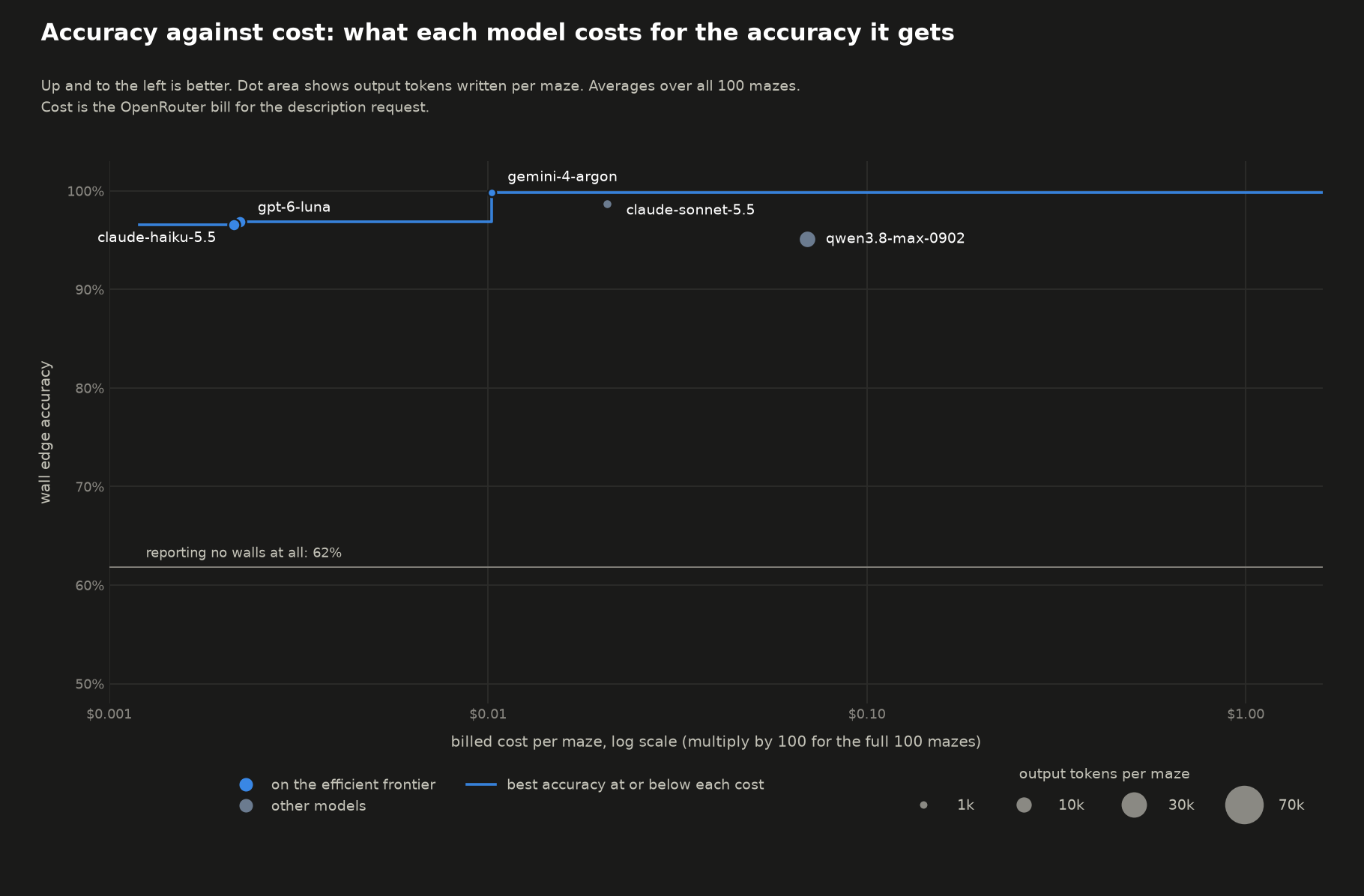
From this, it can be concluded that the results for 20 mazes are more or less the same as for 100 mazes.
Solving the mazes
I decided to only test the solving capability of only 4 models - leaving out qwen3.8-max-0902 because of cost. qwen3.8-max-0902 was the most expensive model while running the describe task (gemini-4-argon had a 50% discount at the time I ran this experiment). The task is to return a string of moves, one letter per move, U, D, L or R, from the start cell to the goal. Each move goes to the adjacent cell and is only allowed if no wall lies between the two cells. The solution string is then walked through the maze using a python script. To recap: 15 mazes have exactly one solution and the remaining 85 have more than one solution. Upon reviewing the first few solves, I found that sometimes the solution ignored walls and got to the right goal, and at other times, the solution would go out of the maze. I classified the former as a “partial failure” and the later as a “complete failure”. Given that, the measurements I performed are:
- Was the solution a success, a partial failure or a complete failure
- If it was a success, was it the optimal solution
- If it was a partial success, how many walls did the solution cross.
Each model was run twice over the set of all 100 graphs. I did not intend to run them twice, but somehow claude-haiku-5.5 came out better than claude-sonnet-5.5 on the first run so I wanted to ensure that was consistent. Surprisingly, claude-haiku-5.5 beat claude-sonnet-5.5 on both runs (although marginally).
Here are even more pretty graphs:
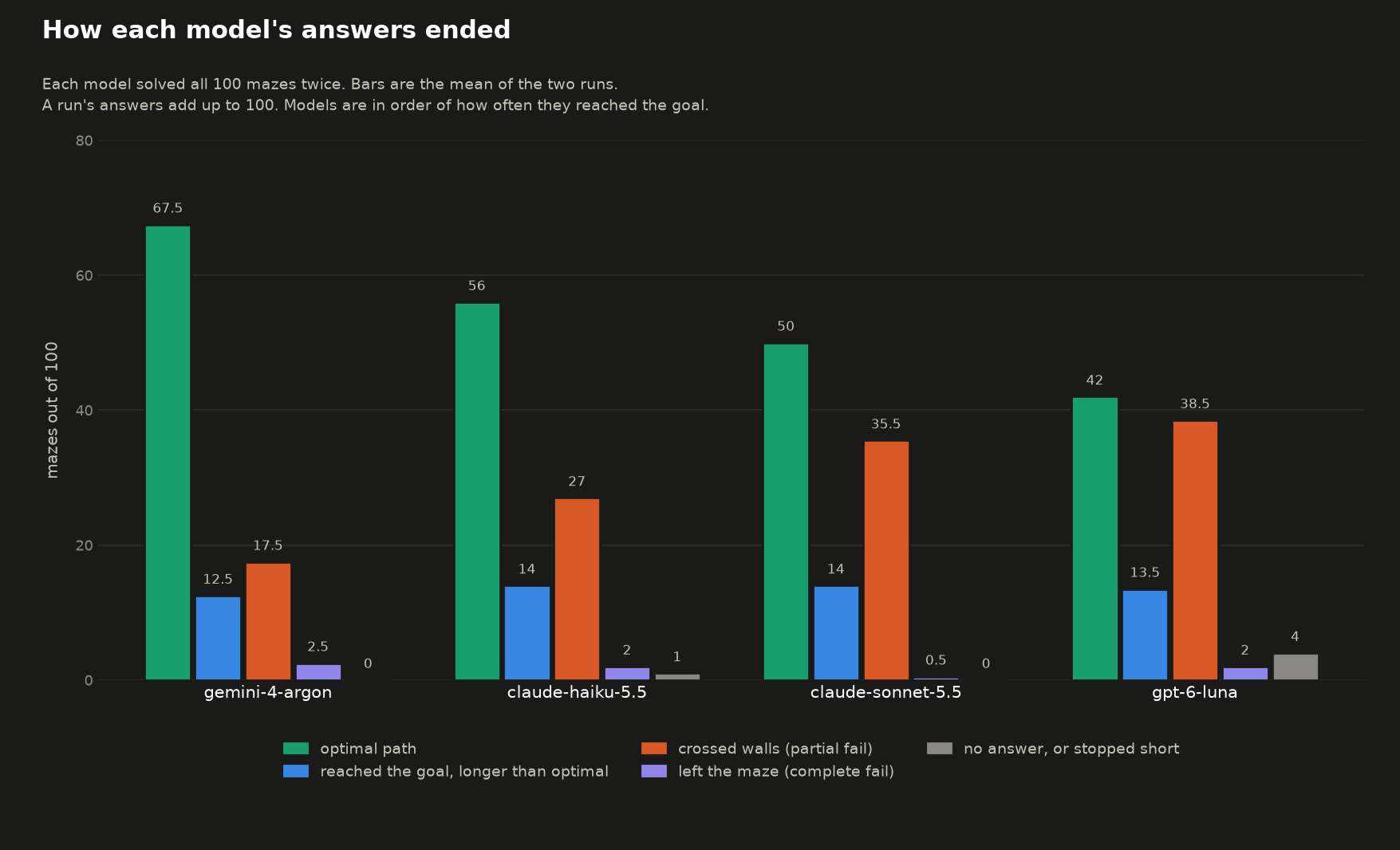
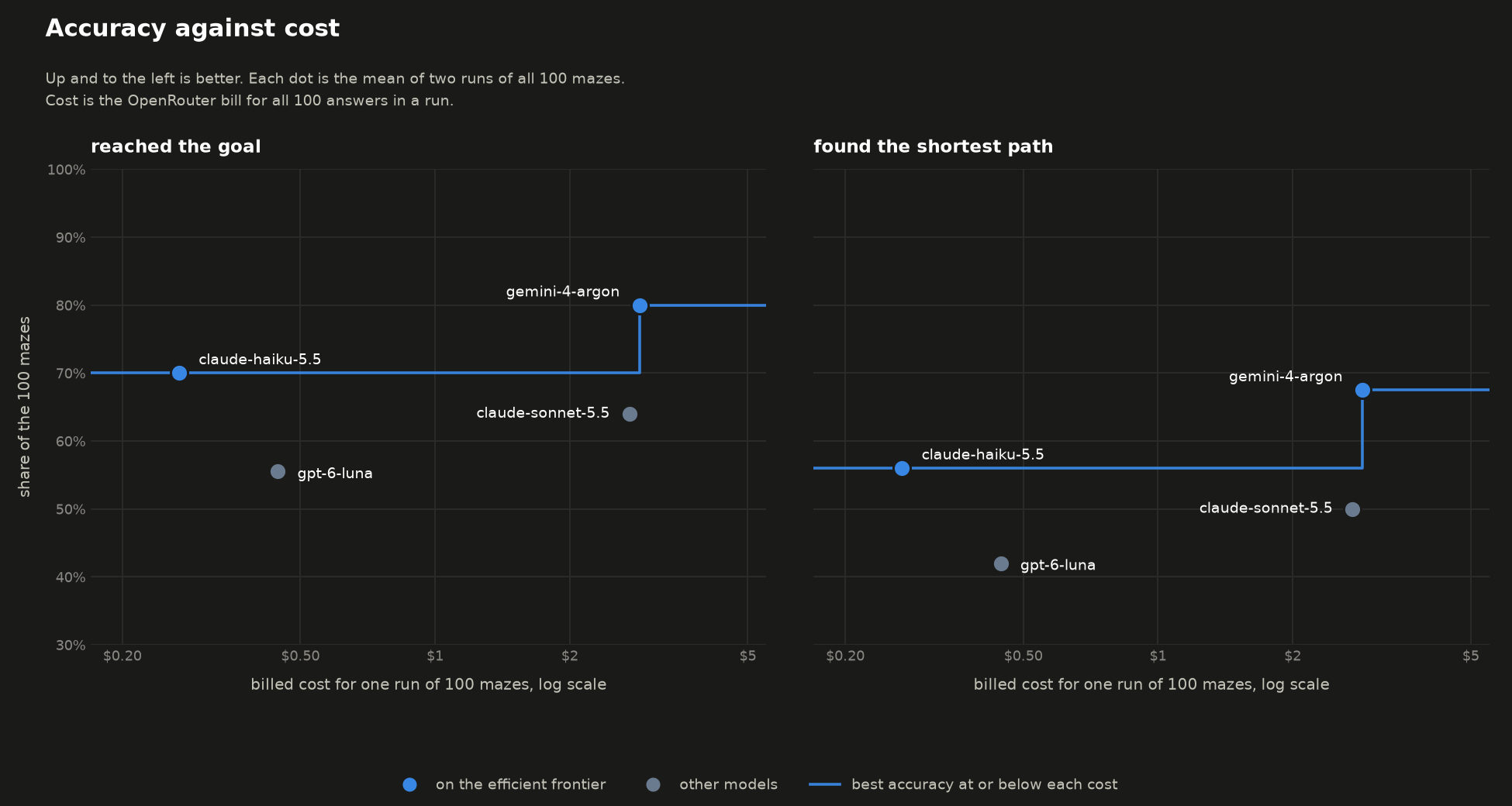
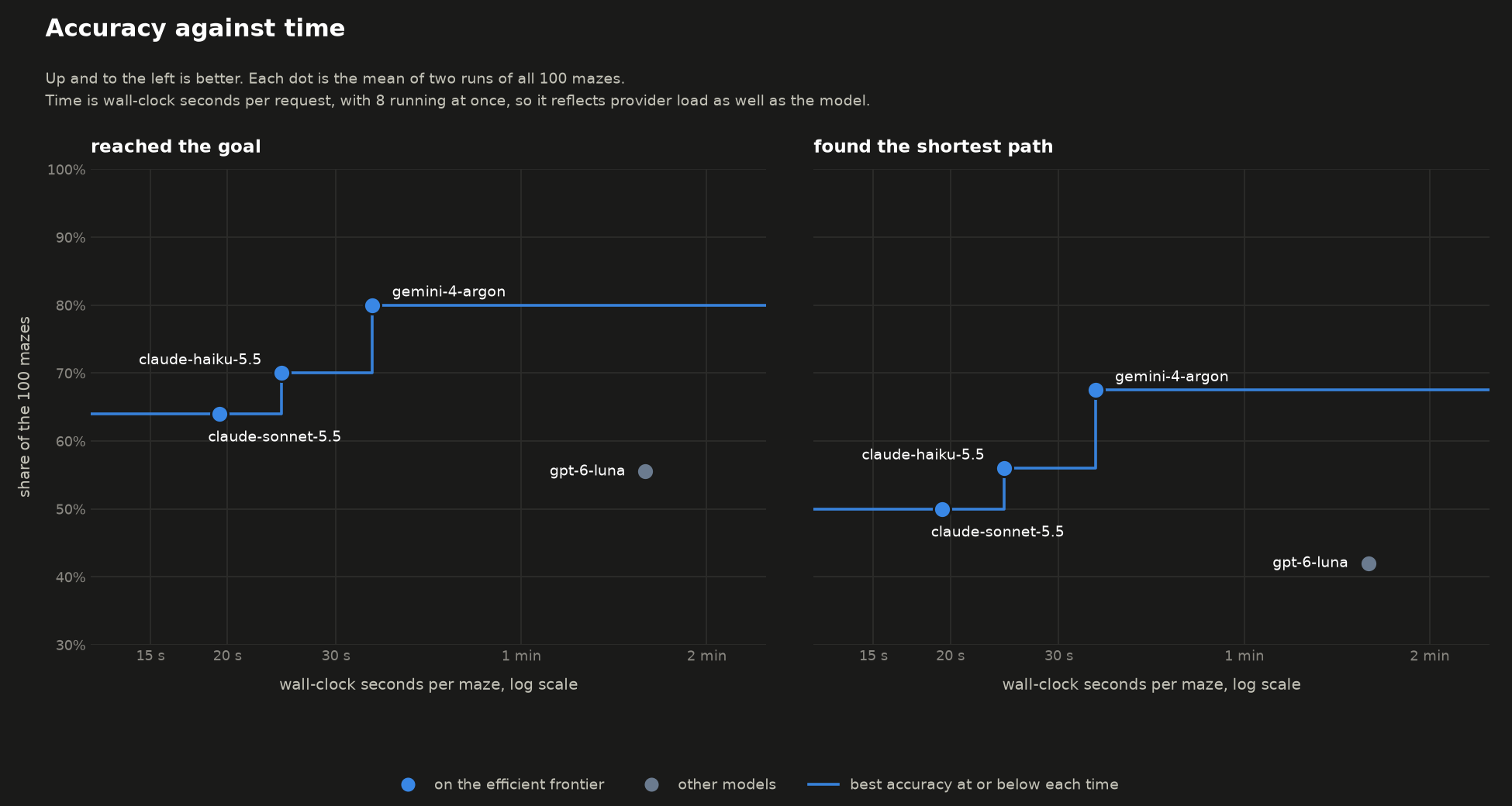
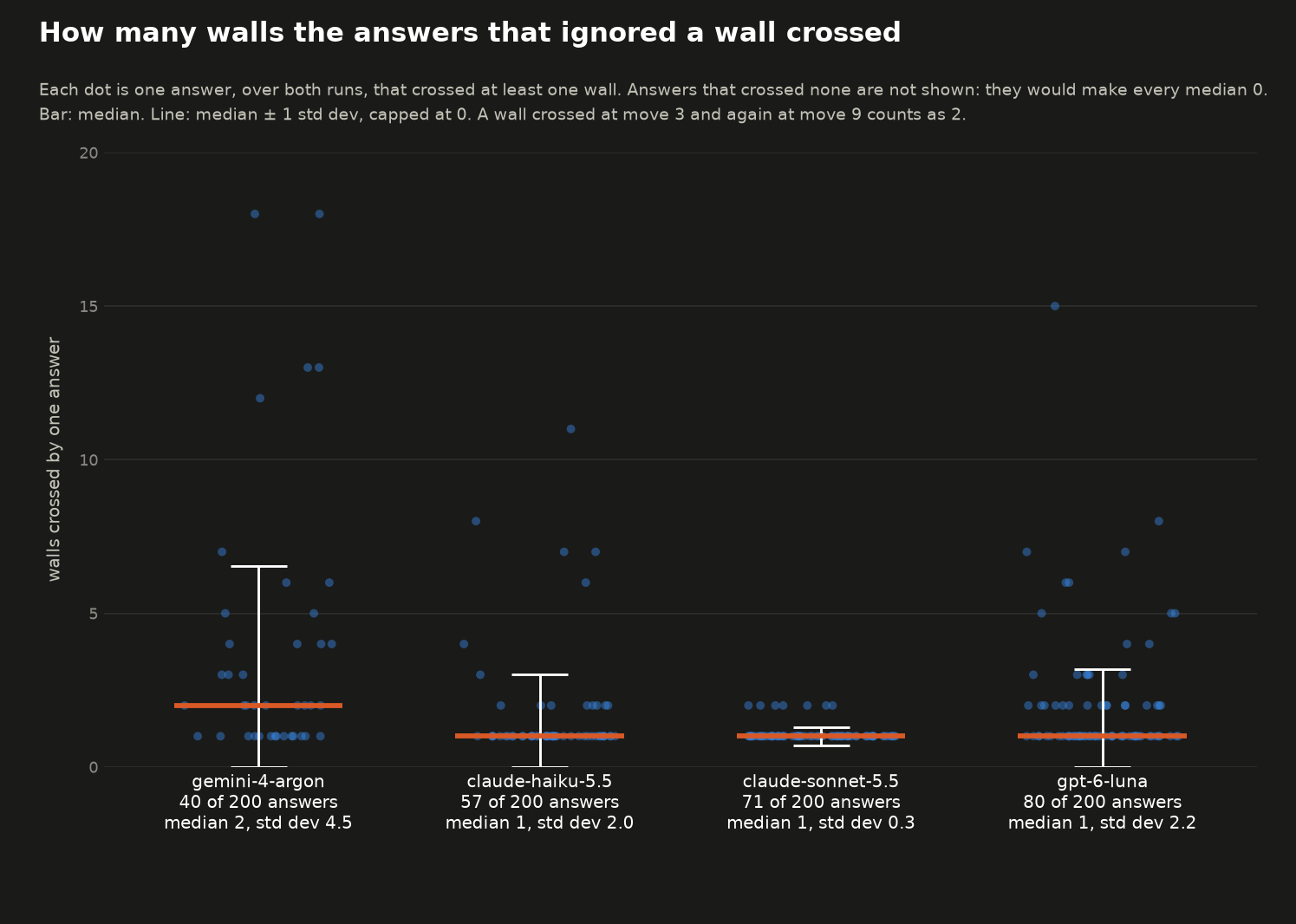
Overall gemini-4-argon performed the best. gpt-6-luna was the cheapest but performed the worst in terms of solving the maze and was also the slowest. As before, the cost and times are based on using OpenRouter.
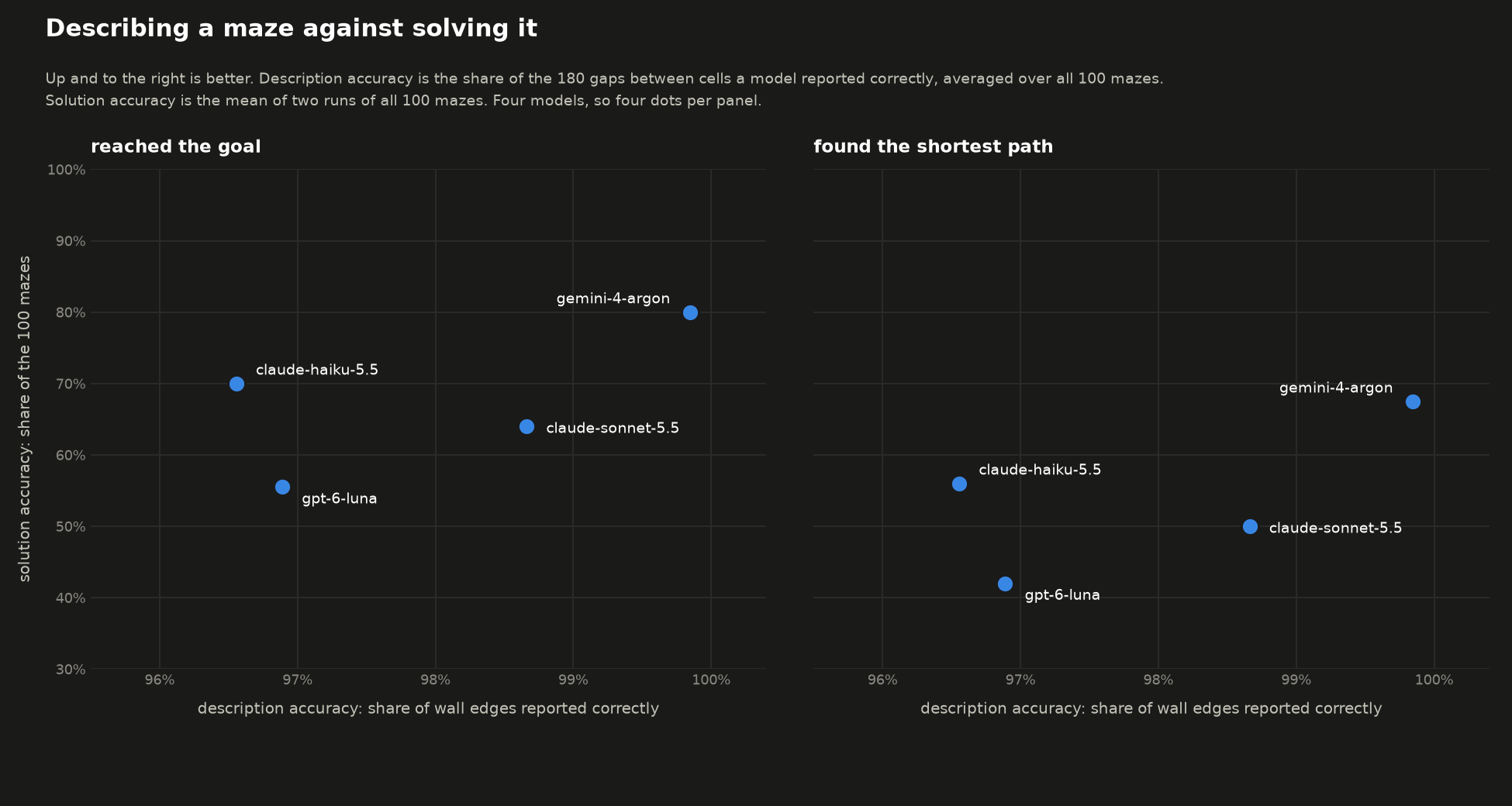
Describing vs Solving
So, if a model can describe a maze well, can it solve it too? gemini-4-argon did the best on both tasks. claude-sonnet-5.5 described the mazes better but did worse when solving compared to claude-haiku-5.5 (again, the difference is marginal).
Total costs
The complete cost for running all the experiments is an even $35 (there’s just something so satisfying about multiples of 5…). Here is the breakdown:
(minimax/minimax-m3.1-flash was free for an introductory period and luckily I ran my experiments during that time.)
| Model | Describe: first 20 mazes | Describe: other 80 mazes | Solve |
|---|---|---|---|
anthropic/claude-sonnet-5.5 | $0.40 | $1.67 | $5.48 |
qwen/qwen3.8-max-0902 | $1.60 | $5.54 | |
google/gemini-4-argon | $0.23 | $0.82 | $5.83 |
meta/muse-spark-1.3 | $2.65 | ||
google/gemini-3.8-flash | $2.26 | ||
moonshotai/kimi-k3 | $1.58 | ||
mistralai/mistral-large-4-0 | $1.33 | ||
x-ai/grok-4.7 | $1.31 | ||
deepseek/deepseek-v4.1-flash | $1.17 | ||
openai/gpt-6-luna | $0.04 | $0.18 | $0.90 |
anthropic/claude-haiku-5.5 | $0.04 | $0.17 | $0.54 |
minimax/minimax-m3 | $0.63 | ||
xiaomi/mimo-v2.6-pro | $0.18 | ||
nvidia/nemotron-3.5-super-vl | $0.16 | ||
z-ai/glm-5.3-flash | $0.14 | ||
typesafe/jev-router | $0.11 | ||
z-ai/glm-5v-turbo | $0.03 | ||
amazon/nova-pro-v1 | <$0.01 | ||
meta-llama/llama-4-maverick | <$0.01 | ||
minimax/minimax-m3.1-flash | $0.00 | ||
| Total | $13.86 | $8.39 | $12.75 |
Deferred experiments
Before I understood the gravity of the cost, I intended to run even more experiments:
Text maze versus image maze: Whether the image is the limiting factor. The same maze is given as text, which removes the need to read pixels.
Navigation tool: Whether letting a model move through the maze step by step, with feedback, helps it solve a maze it cannot solve in one attempt.
However, I decided to not waste more of my bonus, so these experiments are left as an exercise for the readers.
Conclusion
So what did I conclude? Not much really. It was an interesting experiment, I made a bunch of pretty graphs and said some pseudo-scientific things. So, overall it was a success(?). If you are rich enough, I would love to see the results for claude-opus-5.5, claude-fable-5.1,gpt-6-astra, gpt-6.1-terra, and any other models I did not include here which are considered “frontier models”. As always, thanks for wasting your time on reading my ramblings. Until next time!
1eefbb7 @ 2026-10-28